Open-Ended Questions: 50 Survey Examples That Get More Than a “No”
Open-ended questions are questions people answer in their own words instead of choosing from ready-made options. What is your opinion of [product]? is open-ended. Do you like [product]? is closed: the only answers are yes or no.
The 50 examples below are written for surveys, questionnaires and forms — not for interviews, sales calls or classroom discussion.

In short
- What it is: a question with no answer options. People type the answer themselves.
- When to ask it: to learn the reason behind a rating, to catch problems you did not expect, and as the last question of a survey.
- How to add it in Pollsar: a Text question with a single-line or multi-line answer field.
What is an open-ended question?
An open-ended question has no answer options. The person answers in their own words: in a survey it is a text box; in a conversation, a spoken reply.
What is an open question? The same thing under a shorter name; you may also see free-text question. Its opposite is a closed-ended question, where people pick from the options you wrote.
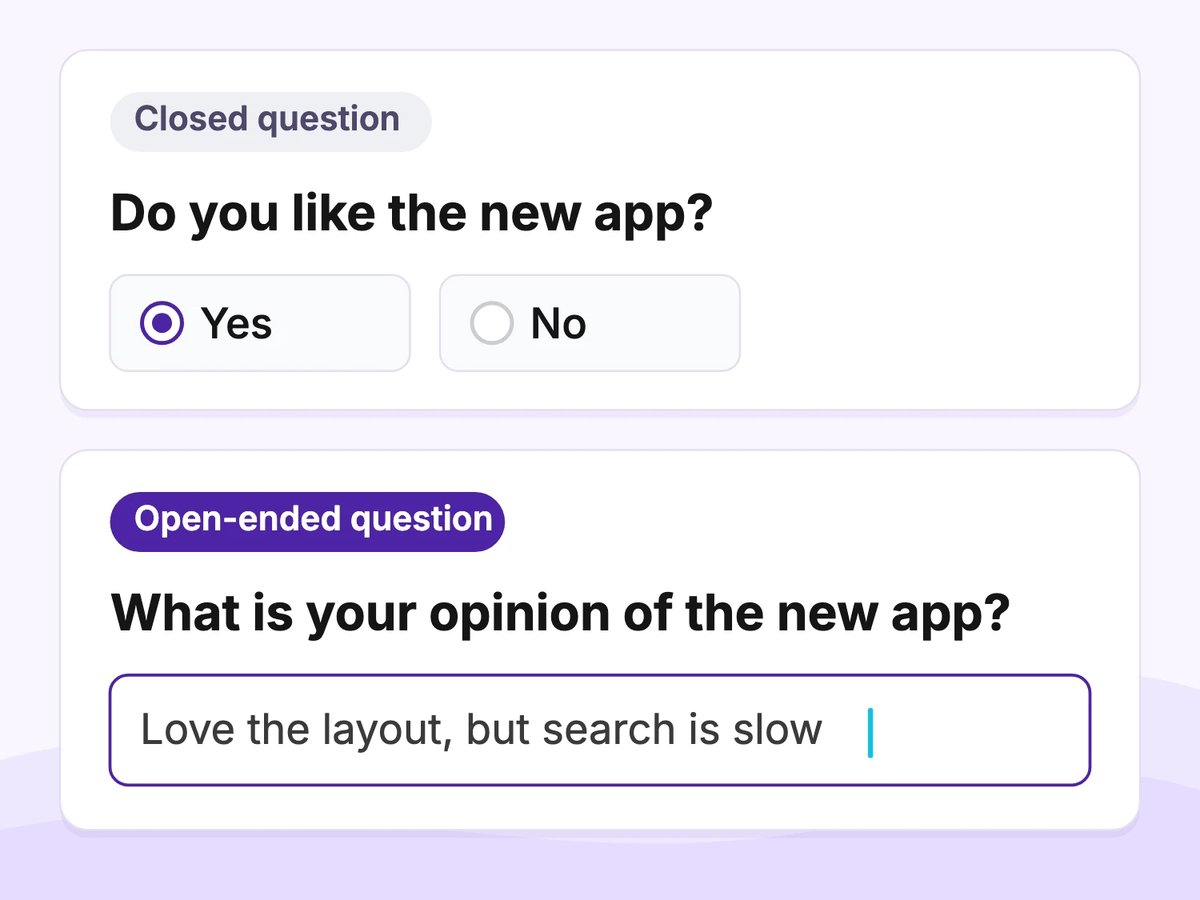
Same subject, different answer form
Words that start an open question
- What — What is the main reason for your score?
- How — How do you use [feature] in your work?
- Why — Why did you give this score?
- Describe — Describe the last time you [did the task].
- Tell us about — Tell us about your experience with [service].
In a written survey, what and how usually read softer than why. A bare why can sound like a request to justify yourself.
Short answer or long answer field
In a survey, an open-ended question needs a text field. There are two kinds:
- Short answer — a single line. For a word, a name, a short phrase or one main reason.
- Long answer — several lines. For an explanation, a story or detailed feedback.
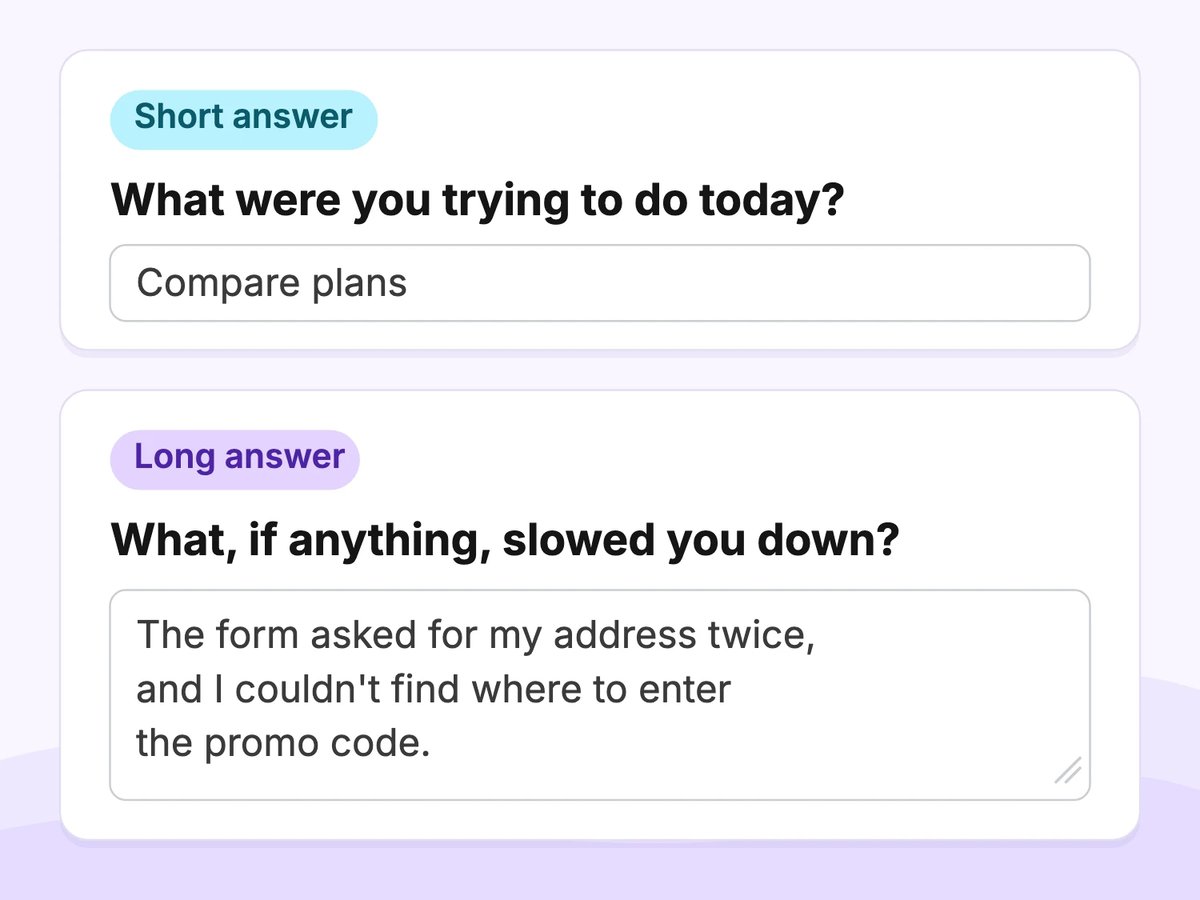
Short answer and long answer fields
Use a single-line field for brief answers and a multiline field for longer responses. Field size does not guarantee response length.
If you need more than a few words, say so in the question: In a sentence or two, what…?
Survey tools name the same two fields differently:
- Pollsar: a Text question in String mode (single line) or Story mode (multiple lines)
- Google Forms: Short answer and Paragraph
- SurveyMonkey: Single textbox and Comment box
50 open-ended survey question examples by situation
Use these open-ended question examples in surveys, questionnaires and forms. Pick the few that fit your goal; don't ask all of them in one survey.
How to read each example:
- [Brackets] — replace with your product, event or course.
- Ask when — the moment the question works best.
- Short answer or Long answer — the field to use.
- In the template — the question already appears in a Pollsar survey template linked under the group.

Customer feedback: 10 questions
- What is the main reason for the score you just gave?
Ask when: right after a satisfaction or NPS rating · Short answer - What did you come to [company] to get done today?
Ask when: at the start of a post-visit survey · Short answer - What, if anything, almost stopped you from buying?
Ask when: right after a purchase · Short answer - What would you tell a friend about [product]?
Ask when: after a few weeks of use · Long answer - What could we do to make [service] more useful to you?
Ask when: in a regular feedback survey · Long answer - What, if anything, should we never change?
Ask when: in a loyalty survey · Short answer - In a sentence or two, how would you introduce [company] to someone new to it?
Ask when: in a brand perception survey · Long answer - What improvements would you suggest for our support service?
Ask when: after a support conversation · Long answer · In the template - What dissatisfied you about our support service?
Ask when: only after a low support rating. Asking everyone? Add “if anything” · Long answer · In the template - What else, if anything, would you like to tell us?
Ask when: as the last question · Long answer
Ready-made survey: the customer support survey template includes both questions marked In the template. In Pollsar, open the Template Gallery tab on the Projects page, click the Customer Support Evaluation card, then Use template. More ready-made surveys: customer feedback survey templates.
Product and website: 8 questions
- What were you trying to do on [site] today?
Ask when: during the visit, in an on-site survey · Short answer - What, if anything, made signing up difficult?
Ask when: right after sign-up · Short answer - What, if anything, is missing from [product]?
Ask when: after a month of use · Long answer - How do you use [feature] in your work?
Ask when: after someone has used the feature a few times · Long answer - What did you expect to happen when you clicked [button]?
Ask when: in a usability test, right after the task · Short answer - What would you use instead if [product] were no longer available?
Ask when: in a retention survey · Short answer - What issues did you notice in the interface?
Ask when: after a low interface rating. Asking everyone? Add “if any” · Long answer · In the template - What technical issues did you notice in the interface?
Ask when: only after someone says they hit a technical problem · Long answer · In the template
Ready-made survey: the UX evaluation survey template includes both questions marked In the template. In Pollsar: Template Gallery → User Interface (UX) Evaluation → Use template.
Employees: 8 questions
- What helps you do your best work here?
Ask when: in an engagement survey · Long answer - What, if anything, gets in the way of your work?
Ask when: in an engagement survey · Long answer - What, if anything, would you change first about how our team works?
Ask when: in a quarterly pulse survey · Short answer - What, if anything, should we stop doing as a team?
Ask when: in a quarterly pulse survey · Short answer - What does our team culture feel like day to day?
Ask when: in a culture survey · Long answer - What would make onboarding easier for the next new hire?
Ask when: at the end of the first month · Long answer - What changes would increase your job satisfaction?
Ask when: in a satisfaction survey · Long answer · In the template - What reduces your satisfaction with your job?
Ask when: after a low satisfaction rating. Asking everyone? Add “if anything” · Long answer · In the template
Ready-made survey: the employee satisfaction survey template. In Pollsar: Template Gallery → Employee Satisfaction Survey → Use template.
Events and training: 6 questions
- What was the most useful part of [event]?
Ask when: right after the event · Short answer - What, if anything, would you change about the format of [event]?
Ask when: right after the event · Long answer - What, if anything, will you do differently after this training?
Ask when: at the end of the training · Long answer - What topic, if any, would you like us to cover next?
Ask when: at the end of a session · Short answer - What events or promotions would you like to see in the future?
Ask when: after an event or promotion · Short answer · In the template - What changes could improve post-training feedback?
Ask when: after people have received feedback on their training · Long answer · In the template
Ready-made surveys: the event feedback survey template and the post-training feedback survey template. In Pollsar: Template Gallery → template name → Use template.
Student and course feedback: 8 questions
- What was the most useful thing you learned in this course?
Ask when: at the end of the course · Short answer - What, if anything, is still unclear about [topic]?
Ask when: at the end of a lesson · Short answer - How, if at all, did you prepare for [assignment]?
Ask when: after the assignment is handed in · Long answer - What would help you learn better in this course?
Ask when: in the middle of the course · Long answer - How would you explain [concept] in your own words?
Ask when: as a self-check at the end of a lesson · Long answer - What, if anything, do you want to get better at in this [unit]?
Ask when: at the start of a unit · Short answer - What, if anything, would you change about the assignments?
Ask when: at the end of the course · Long answer - What advice would you give a student starting this course?
Ask when: at the end of the course · Long answer
For course feedback, start on the free plan and add the questions you picked as Text questions.
Research questionnaires: 10 questions
- How does [task] get done for you today?
Ask when: in discovery research · Long answer - What, if anything, do you use for [task] today?
Ask when: in discovery research · Short answer - What does a typical week of [activity] look like for you?
Ask when: in discovery research · Long answer - Describe the last time you [did the activity].
Ask when: after a question that confirms they have done it · Long answer - When you compare [product category] options, what decides it for you?
Ask when: in market research · Short answer - What words would you use to describe [brand]?
Ask when: in a brand perception study · Short answer - What made you pick [current product]?
Ask when: after they name the product they use · Short answer - What would make [task] easier for you?
Ask when: at the end of a discovery questionnaire · Long answer - What product or service are you looking for?
Ask when: after someone says they are looking for one. Asking everyone? Add “if any” · Short answer · In the template - What problems are you looking to solve with a product or service?
Ask when: in audience research · Long answer · In the template
Ready-made survey: the target audience research template. In Pollsar: Template Gallery → Target Audience Research → Use template.
Open vs. closed questions: the short version
- Answer format: closed — pick from your options; open — own words.
- Data you get: closed — counts and percentages; open — reasons, words and ideas you did not list.
- Effort to answer: closed — a click; open — typing.
- Results: closed — ready charts; open — text you read and group yourself.
Same subject, only the answer form changes:
- Do you like [product]? → What is your opinion of [product]?
- Was the event useful? → What did you think of the event?
- Was our support helpful? → How would you describe the help you got from our support?
The opposite of an open-ended question is a closed-ended one. Choosing between open-ended and closed-ended questions comes down to the data you need. Most surveys mix both: closed questions to count, open ones to explain.
How to write an open-ended question
To make an open-ended question that gets useful answers, follow six rules:
- Start with what or how. It invites a description, not a yes or no.
- Keep one subject. What do you think of our prices and delivery? asks two things at once.
- Narrow the frame. Ask for one thing or the main reason — vague questions get vague answers.
- Use neutral words, no built-in assumptions. Add if anything when you ask everyone.
- Put it after the related rating. What is the main reason for your score? only makes sense right after the score.
- Make it required only if you need it. A forced text box gets “ok”, “n/a” or a closed tab.
Say the expected length in the wording itself: In a few words…, In a sentence or two…
Before → after: six rewrites
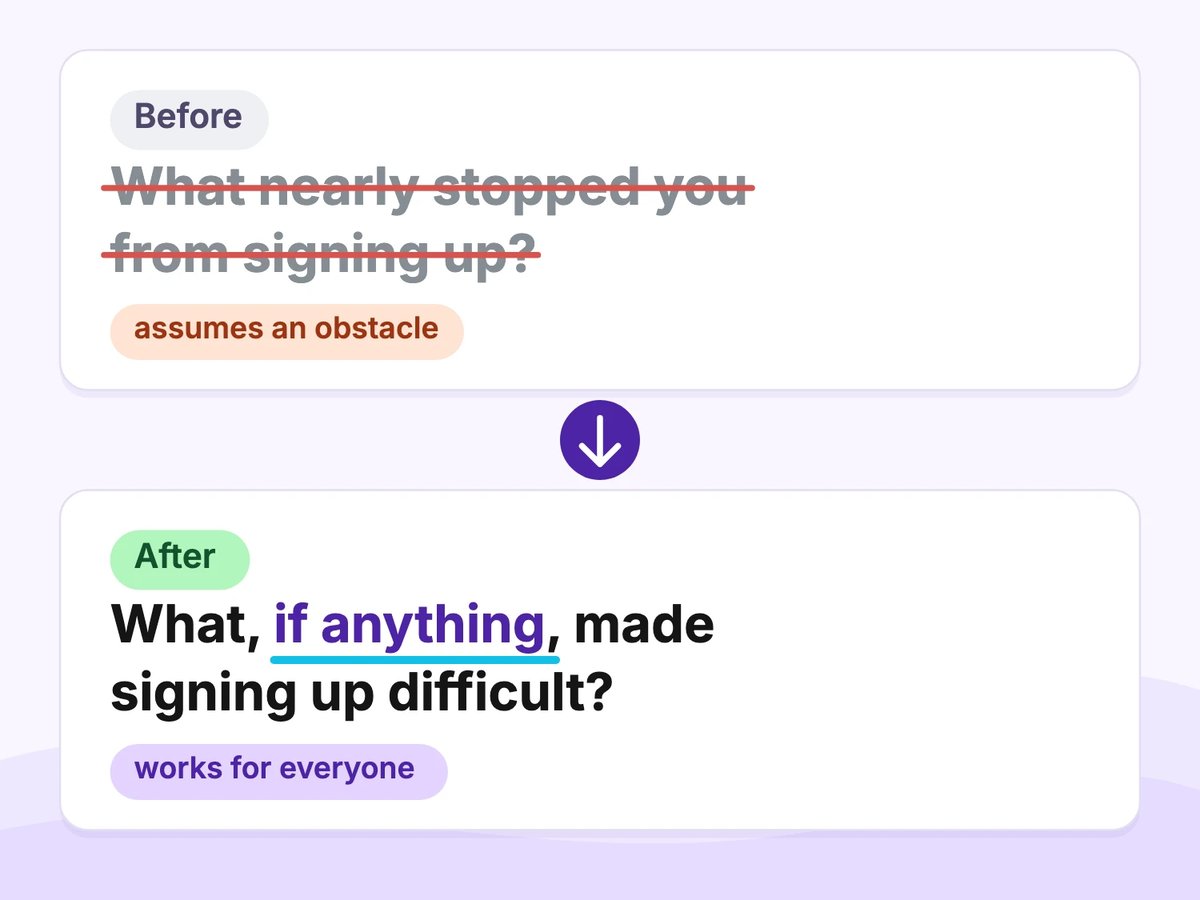
One word removes the built-in assumption
Do you have any comments about checkout?→ What, if anything, slowed you down at checkout?
Why: a yes/no opening invites “no”.What do you think of our prices and delivery?→ What do you think of our delivery?
Why: two subjects, one answer.Any thoughts on the app?→ What is the main reason you opened the app today?
Why: too broad to answer quickly.What nearly stopped you from signing up?→ What, if anything, made signing up difficult?
Why: it assumes there was an obstacle.Why?(as question 1) → What is the main reason for your score? (right after the rating)
Why: without the rating, there is nothing to explain.Required: Tell us everything about your experience→ Optional: In a sentence or two, what stood out?
Why: a forced long answer gets filler.
Before you send: 6 checks
- Starts with what or how
- One subject
- Narrowed frame: one thing, the main reason
- No built-in assumption
- Follows its rating, if it explains one
- Required only if needed
When to use open-ended questions, and how many
A good fit
- The reason behind a rating: What is the main reason for your score?
- Problems you don't know about yet — you can't list options for them.
- The last question: What else, if anything, would you like to tell us?
Better as a closed question
- You need numbers you can compare across everyone.
- You already know the likely answers.
- The survey is long and every question costs attention.
How many? A few, and only the ones you need. Every open answer has to be read and coded by hand — see the worked example below.
What two Pew Research Center analyses found
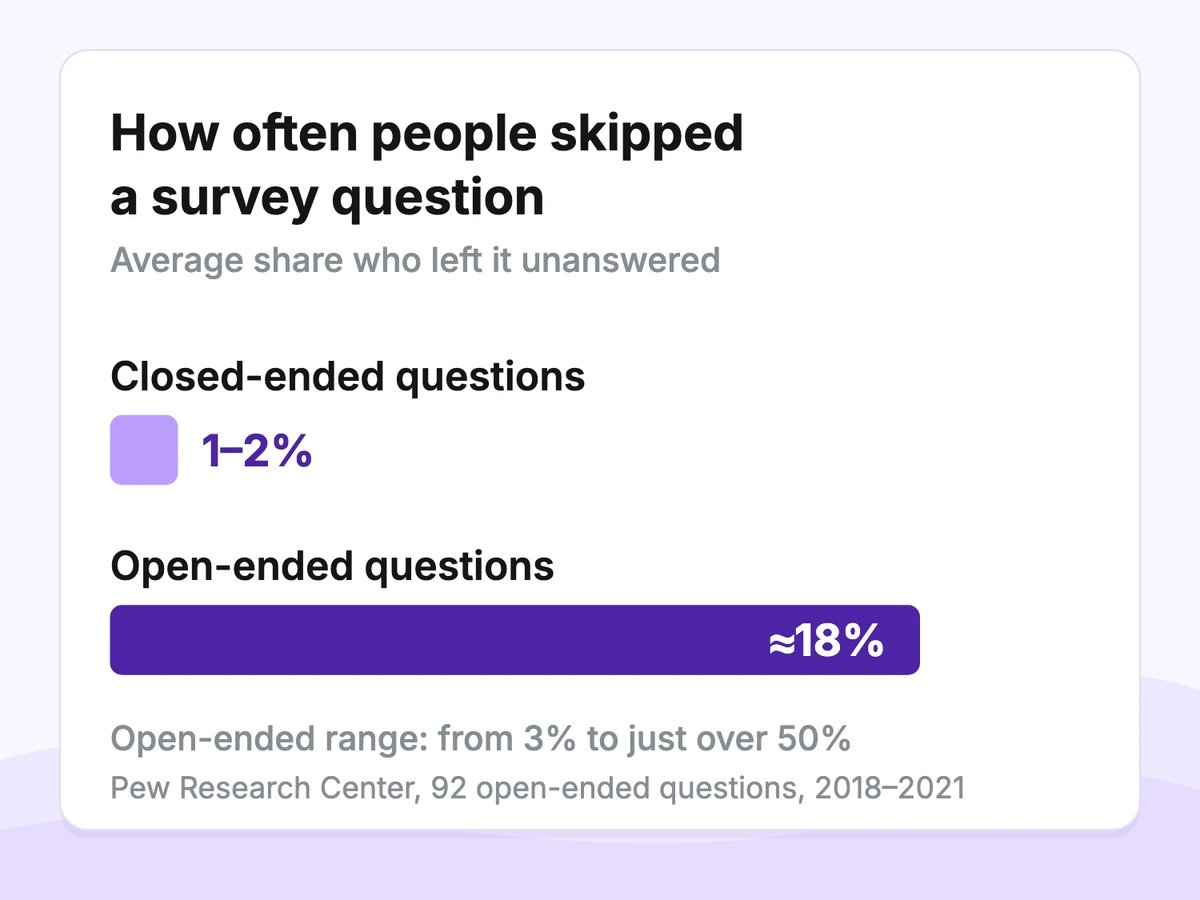
Average item nonresponse on the American Trends Panel, Pew Research Center, 2021
- 2021: 92 open-ended questions from more than 40 surveys of Pew's online American Trends Panel (US adults), September 2018 – July 2021. On average about 18% of panelists skipped an open-ended question (from 3% to just over 50%).
Closed-ended questions on the same panel: 1–2% on average. The authors note this is not a case for dropping open-ended questions. Source - 2023: 30 open-ended questions from 26 general-population surveys on the same panel, November 2018 – September 2021. Nonresponse (an empty field) ranged from 4% to 25%, median 13%: 15% each on tablets and phones, 11% on computers. Source
- 2023, length: questions asking for several sentences were skipped more often (median 17%) than one-word or short-sentence questions (12%). On the 19 questions asking for at least a short sentence, answers typed on a computer averaged 113 characters, on a tablet 87, on a phone 80. Source
Open-ended questionnaires and surveys
An open-ended questionnaire or open-ended survey is one where most questions have no answer options. Open questionnaires make sense when the sample is small, when you are exploring a new topic, or when you run interviews in writing.
For a larger audience, keep the base closed and add a few open questions where you need the reason.
How to add an open-ended question in Pollsar
From a template
Open the Template Gallery tab on the Projects page, pick a template from the groups above and click Use template. The copy is a regular project: edit any question.
Some templates include follow-up questions meant for specific answers. Showing a question only after certain answers needs branching, which starts on Pro. On the free plan, go through the copied survey yourself before you share it.
From scratch
- On the Projects page, click + New project, give it a title, click Create, then open the project.
- Add a Text question.
- Choose the mode: String for a short answer, Story for a long one.
- Check whether the question is set as required before you publish.
- On the Publish tab, open the survey and share the link or QR code.
With the AI assistant
Click + New project and switch to the Create with AI tab. Describe the topic, goal, tone and language — the AI creates a draft with questions and answer options. For example:
Create a customer feedback survey about [product]. Goal: learn what to improve. Tone: friendly. Language: English.
Then review the draft in the builder and add the open-ended questions you picked from this article.
Asking “why” after a rating
- Free: put the open question right after the rating, for everyone — with if anything.
- Pro and above: use branching to show it only after a low score.
- Inside a choice question: an Other option with a text field is a small open answer within a closed question.
Before you share, go through the survey on the Style tab as a respondent and type a long answer into each text field.
Where your answers appear
- Summary statistics: text answers are shown as a list, split across pages when there are many. There are no charts for text.
- Individual Review: the respondent card shows one person's full answers.
- Export to CSV, XLSX or JSON starts on Pro.
How to analyze open-ended responses: a worked example
- Read all the answers once.
- Create codes from what people actually wrote — don't fix the number of themes in advance.
- Give each answer one or more codes.
- Merge codes that mean the same thing.
- Count answers per code.
- Pick a few quotes that show each code.
Example data, invented for illustration. The question What, if anything, made signing up difficult? was shown to 40 people. Six skipped it, 34 answered.
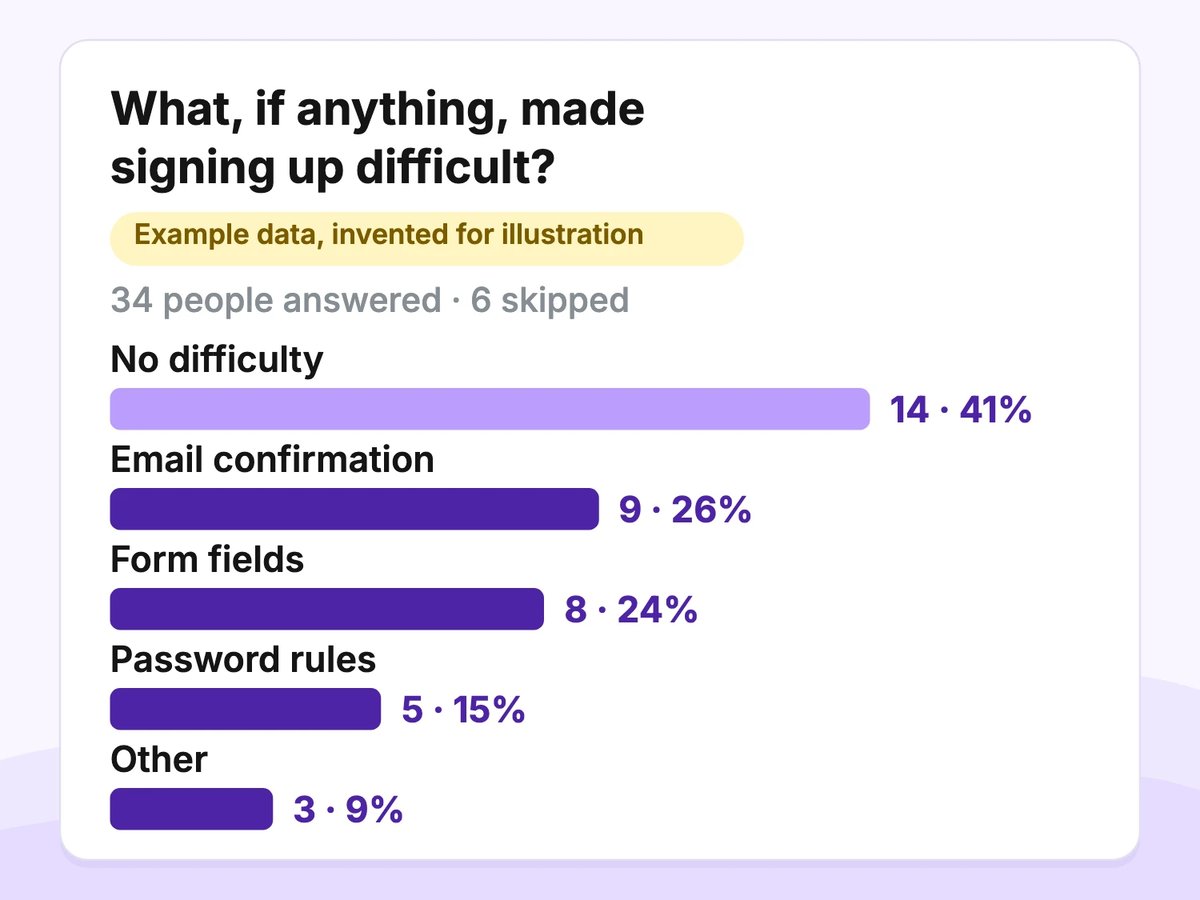
Example data, invented for illustration
- No difficulty — 14 answers (41%)
- Email confirmation — 9 (26%)
- Form fields — 8 (24%)
- Password rules — 5 (15%)
- Other — 3 (9%)
Count people, not mentions. A theme counts once per answer.
One answer can carry two codes. The confirmation email took ages, and the form asked for my phone number twice → Email confirmation and Form fields.
Merge close codes: Email didn't arrive and Confirmation link expired → Email confirmation. Give every code a one-line definition.
Nothing is a code too (here: No difficulty) — count it, don't throw it away.
The denominator is 34 people who answered; the 6 who skipped are reported separately. There are 39 codes for 34 answers, so the shares add up to more than 100%.
Coding table to copy: Code | Definition | Answers | Share
This manual method suits dozens or hundreds of answers. Keep the codes in your own spreadsheet. On the free plan, read the answers in Pollsar and copy them over; export starts on Pro.
Open-ended questions: FAQ
What is an example of an open-ended question?
What is your opinion of [product]? is open-ended: people answer in their own words. Do you like [product]? asks about the same thing but is closed — the answer is yes or no.
What are 5 open-ended questions?
1) What is the main reason for the score you just gave? 2) What, if anything, made signing up difficult? 3) What helps you do your best work here? 4) What was the most useful part of [event]? 5) How does [task] get done for you today? The full list of 50 is above.
What are 5 examples of words used to start an open question?
What, how, why, describe and tell us about. For example: What is the main reason…, How do you use…, Why did you give this score…, Describe the last time…, Tell us about your experience…
How do you create an open-ended question?
Remove the answer options, start with what or how, keep one subject and leave out any built-in assumption. In Pollsar it is a Text question with a String or Story field.
What is the opposite of an open-ended question?
A closed-ended question: people choose from options you wrote. See the short comparison above.
What is an open-ended questionnaire?
A questionnaire where most questions have no answer options. It fits small samples and early exploration of a topic.
Should open-ended questions be required?
Usually not: a required text box collects filler like “ok” or “n/a”. In Pollsar, check whether the question is set as required before you publish.
How do you analyze open-ended responses?
Read all the answers, create codes from the material, give each answer one or more codes and count answers rather than mentions. Report shares out of the people who answered. In Pollsar, text answers appear as a list and in each respondent card; export starts on Pro.
Turn these questions into a survey
Open-ended questions show the reasons behind your numbers. Pick the few that fit your goal, put any “why” question right after the rating it explains, and do a test run on the Style tab before you share.
Start on the free plan or browse survey templates. Pollsar question types are described in the question types reference.