Survey Screening Questions: Examples, Rules and a Polite Exit
Survey screening questions, also called qualifying questions, decide who answers your survey. You can put them at the start of a longer survey or send them as a separate recruitment questionnaire before a beta test or an interview. People who match the group you need go on; everyone else lands on a short thank-you page. Which smartphone do you use most often? works as a screening question when the survey is only for Android users.
What a screener survey does, and when you need one
A screener survey, also called a screener questionnaire, is that short set of qualifying questions. Most guides describe it for paid panels, where a research company supplies respondents and is paid for each completed survey. A screener matters just as much when the link goes to your own people: a newsletter, followers, last year’s guests. Any list like that holds more kinds of people than one survey needs. Where the screener sits in the whole plan is covered in the guide on how to design a survey.
- You need a screener when the survey only makes sense for part of the people who will see the link: Android users, people who booked in the last six months, listeners who know the show.
- You can skip it when the list already is the group. A survey sent only to this week’s buyers needs no question about whether they bought.
- Route instead of screening when everyone’s answers count but different people need different questions. Online viewers and in-person guests of one event can each get their own set inside a single survey with branching questions.
Write the rule before the questions
A screener can go wrong before the first question is written, at the moment someone says we need active users. Active how often, on which device, doing what? Write your target as a few conditions you could check against one person’s answers. Take a meal-planning app that wants 20 Android users from its newsletter to test a new shopping-list feature. The team wrote its target in four lines.
- Must have: an Android phone as the main smartphone.
- Must have: made a list, on paper or digitally, the last time they bought groceries.
- Must not: work in market research or on a food or recipe app. These people test the feature with a professional eye, not as ordinary shoppers.
- Pick by hand: a mix of household sizes among those who qualify, plus a real, recent shopping story from each.
Each must-have turns into one question, and so does each must-not. The pick-by-hand line becomes two questions that screen nobody out: one about the household and one open question the team reads. Anything that is only interesting, like age or city, stays out. It adds a question and decides nothing.
Common screening questions by type
Most criteria fall into a few kinds: something a person did recently, a product they use, their job or company, their age or where they live. Below, each kind is written the way the rest of this guide teaches, with the target hidden among plausible options. Replace the words in [brackets] with your own. Research firms add attitudes to the list. The guide by Kantar sorts screening questions into demographic, firmographic, product, attitude and behavior types. An attitude is the hardest of these to check, so where you can, ask what people did.
- Recent behavior. When did you last [order groceries online]? In the past month / 1–6 months ago / 7–12 months ago / More than a year ago / Never
Goes on: the period your survey is about, for example the first two. - Product use. Which of these [meal-kit services] have you used in the past three months? Select all that apply. [your product] / [three or four others people really use] / None of these
Goes on: anyone who selects your product. - Job role. Which best describes your part in choosing [accounting software] at work? I make the final decision / I recommend options / I use what others choose / I’m not involved
Goes on: the first two if you need both decision-makers and people who recommend options. For final decision-makers only, keep just the first answer. - Company size. How many people work at your company? Just me / 2–10 / 11–50 / 51–200 / 201–1,000 / More than 1,000
Goes on: the sizes you sell to. - Age or location. Which age group are you in? Under 18 / 18–24 / 25–34 / 35–44 / 45–54 / 55 or older / Prefer not to say
Goes on: the groups the survey is about. Decide in advance where Prefer not to say goes. Location works the same way: a list of regions that ends with Somewhere else. - Industry exclusion. Which of these fields, if any, do you work in? Select all that apply. [the field you must leave out] / [four ordinary fields] / None of these
Leaves: anyone who selects the field you must leave out. The beta screener below uses this question.
How to write screening survey questions that don’t give away the answer
A screener has an unusual reader. Some people want in for the reward, the early access or the chance to be heard, and they read each question looking for the answer that lets them through. Four wording habits take that hint away. Research firms that write screeners every day, Kantar and Nielsen Norman Group among them, describe the same habits.
Ask about recent behavior, not yes or no
Do you use an Android phone? tells everyone what you want to hear. When a yes-or-no question would give away the qualifying answer, offer several plausible options instead: the person picks what is true, and the target hides among the alternatives. Kantar shows the pattern with fast food. Instead of asking whether someone visits one chain every week, it lists several chains and adds None of these.
- Do you use an Android phone? → Which smartphone do you use most often? iPhone / Android phone / A smartphone with another operating system / I don’t use a smartphone
A yes-or-no question shows the right answer. - Do you plan your shopping? → How did you make a list the last time you bought groceries? On paper / Digitally / Both / I shopped without a list / I didn’t do the shopping
A question about habits invites the person people would like to be. The last purchase is a fact, and it works whether they shopped in a store or online. - Are you a regular customer? → When did you last order from us? In the past month / 1–6 months ago / More than 6 months ago / I haven’t ordered yet
Regular means something different to every reader.
Hide the cutoff and leave a way out
Answer ranges should not show where your line is. If you need people who have heard three episodes or more, offer None yet / 1–2 / 3–10 / More than 10, not Fewer than 3 / 3 or more. Give every list an honest exit such as None of these or Something else, so nobody has to pick a nearly true option to move on. When the options have no natural order, as with brands or fields of work, shuffle them so the qualifying answer does not sit in the same place for everyone. CloudResearch suggests five to seven options per question as a guide: fewer make the target easy to guess. A much longer list also turns a phone screen into a wall of text. If two options could describe the same person, the guide to multiple choice survey questions shows how to separate them.
Catch the person who selects everything
When a question allows several answers, some people select them all, hoping one is the key. Nielsen Norman Group suggests plausible distractors for this: options that fit real people, so the target does not stand out, and that a genuine member of your group would rarely pick all together. It also advises leaving out people who select every answer, above all when they do it in more than one question. The beta screener asks about fields of work for this reason. Three of its fields have nothing to do with the test, and a person who selects all five also selects an excluded one and leaves.
Keep it short and put it first
CloudResearch suggests four or fewer screening questions in typical cases, and Kantar keeps to five or fewer as a rule of thumb. Put them at the very start and ask first the question that removes the most people, so those who don’t fit leave after one click instead of four. If that question would reveal your target, open with a broader one. Never screen someone out after minutes of the main survey. Ask for an email or a name only after a person qualifies: you have no reason to keep contact details of people you turned away.
Worked example: recruiting 20 beta testers, question by question
Back to the meal-planning app. The team needs 20 Android users who shop with a list and sends one link to its newsletter. This is the whole screener, with who goes on and who leaves after each question.
- Which smartphone do you use most often? iPhone / Android phone / A smartphone with another operating system / I don’t use a smartphone
Goes on: Android phone. Everyone else leaves. - How did you make a list the last time you bought groceries? On paper / Digitally / Both / I shopped without a list / I didn’t do the shopping
Goes on: the first three. Everyone else leaves. - Which of these fields, if any, do you work in? Select all that apply. Marketing or advertising / Market research / Journalism / Food or recipe apps / Healthcare / None of these
Leaves: anyone who selects market research or food or recipe apps, alone or with other fields. Healthcare alone goes on. Healthcare plus market research leaves, and so does the person who selects every field. - How many people live in your household, including you? 1 / 2 / 3–4 / 5 or more
Nobody leaves. The team uses it to pick a mix of households. - Tell us about the last time you bought groceries. What did you buy, and how did you keep track of it?
Nobody leaves here either. The team reads these answers before inviting anyone. - What email address should we use to invite you to the test?
Only people who qualified ever see this question.
Question 5 is open on purpose. A recent, specific story gives the team something concrete to review, and the guide to open-ended questions that get real answers shows how to word one so it gets more than a single line.
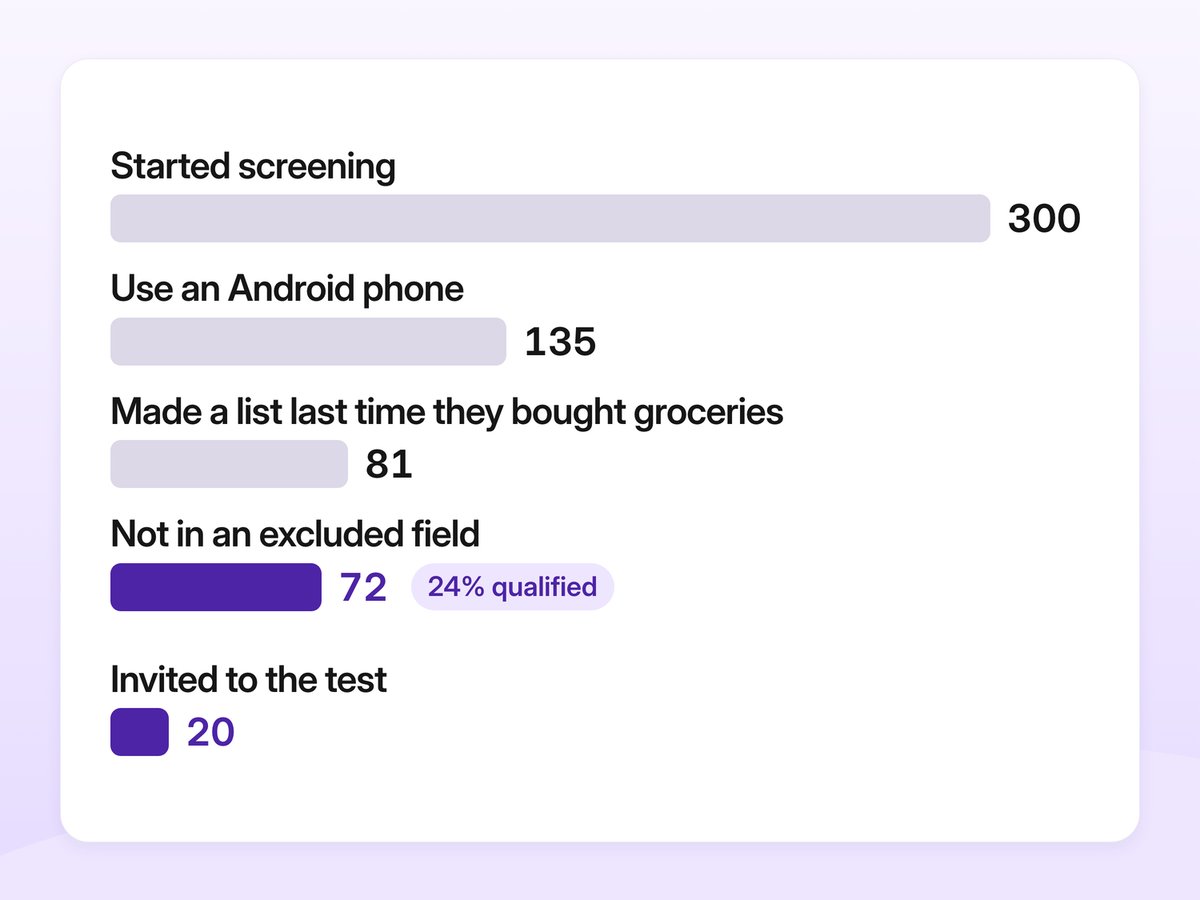
Of 300 people screened, 72 qualified. The team invited 20 of them.
Say 300 subscribers start the screener and each of them answers until the survey decides. 135 pick Android. 81 of those made a list the last time they bought groceries. 9 of those work in an excluded field, which leaves 72 who qualify and 228 who don’t. The team invites 20 of the 72. The pass rate is 72 out of 300, or 24%.
SurveyMonkey’s guide works out this share, the incidence rate, the same way: qualified people divided by everyone the screener decided about. Count people who leave before an eligibility decision separately. Once someone qualifies, a later unfinished answer does not change that decision. At 24%, finding 40 qualified people next time takes about 40 ÷ 0.24 ≈ 167 people who answer until the screener decides. If you don’t know the share yet, send the link to a small part of your list first and keep the screened-out answers, so you can count it. Later, when you analyze the survey results, base them only on the people who qualified.
Screening question examples for your own audience
These four sets are for links you share with people you already reach: customers, guests, students, listeners. Replace the words in [brackets] with your own. The line under each question says who goes on.
Customers of a shop or service
A bike repair shop wants feedback on its new online booking and posts the link on social media, where many followers have never booked anything.
- When did you book your most recent bike repair or service at [shop name]? On or after [launch date] / Before [launch date] / I’ve never booked there / I’m not sure
Goes on: On or after [launch date]. - How did you book that repair? On the website / By phone / In person / Someone else booked it
Goes on: On the website. Phone and walk-in customers are welcome in another survey, not in this one about online booking.
Event guests
After a conference the organizers share one feedback link in the attendee chat. Everyone who came has something to say, but not about the same things, so this is a case for routing more than screening.
- Which parts of [event] did you attend? Select all that apply. Workshops in person / Talks in the main hall / The online stream / I registered but couldn’t come
Each part gets its own questions, and someone who selected two parts sees both sets. Couldn’t come gets one question about what stopped them, then a thank-you. - Which workshop did you join? [workshop titles] / I don’t remember the title
This picks which workshop the ratings are about. Forgetting a title is no reason to leave: those guests rate the workshops in general.
Study participants
A student researcher studies people who cycle to work or class and sends the screener to a university mailing list.
- How did you get to work or class last week? Select all that apply. Car / Bus or train / Bicycle / On foot / Another way / I worked or studied from home / I didn’t go to work or class last week
Goes on: anyone who selected Bicycle. Only they see the next question. - On how many days last week did you cycle for at least part of your trip to work or class? A number from 0 to 7
Goes on: 2 or more. A number field hides the cutoff better than a list that starts at 2 or more.
Listeners, readers and followers
A podcaster wants opinions on a new format, but only from people who know the show well.
- How many episodes of [show] have you listened to? None yet / 1–2 / 3–10 / More than 10
Goes on: the last two. - Which of these topics has [show] covered? Select all that apply. [three real topics] / [two topics the show never touched] / I’m not sure
Goes on: people who pick real topics and none of the invented ones. - Describe one moment from [show] you still remember.
Nobody leaves. The podcaster reads these before inviting anyone to the format test.
Once the screener works, the main survey follows it. Start with the beta screener above and swap in your own criteria. To draft the part that qualified people will see, the collection of sample survey questions is sorted by topic, and the Pollsar pages for events and for researchers show ready formats for those two cases.
What to show people who don’t qualify
For many readers a screener ends on one short page: the screen-out page, which research panels call a termination message. In the beta example, 228 people saw the screen-out page and 72 qualified to continue. When those people are your customers and followers, the page should leave them glad they clicked.
- Thank them and keep the reason to yourself. This test is only for Android users invites a second try with a different answer.
- Say it plainly and kindly. You do not qualify reads like a rejected form. It isn’t a match this time reads like a person.
- Give something back: a short general survey, an article they would enjoy, or a note on how to hear about the next study.

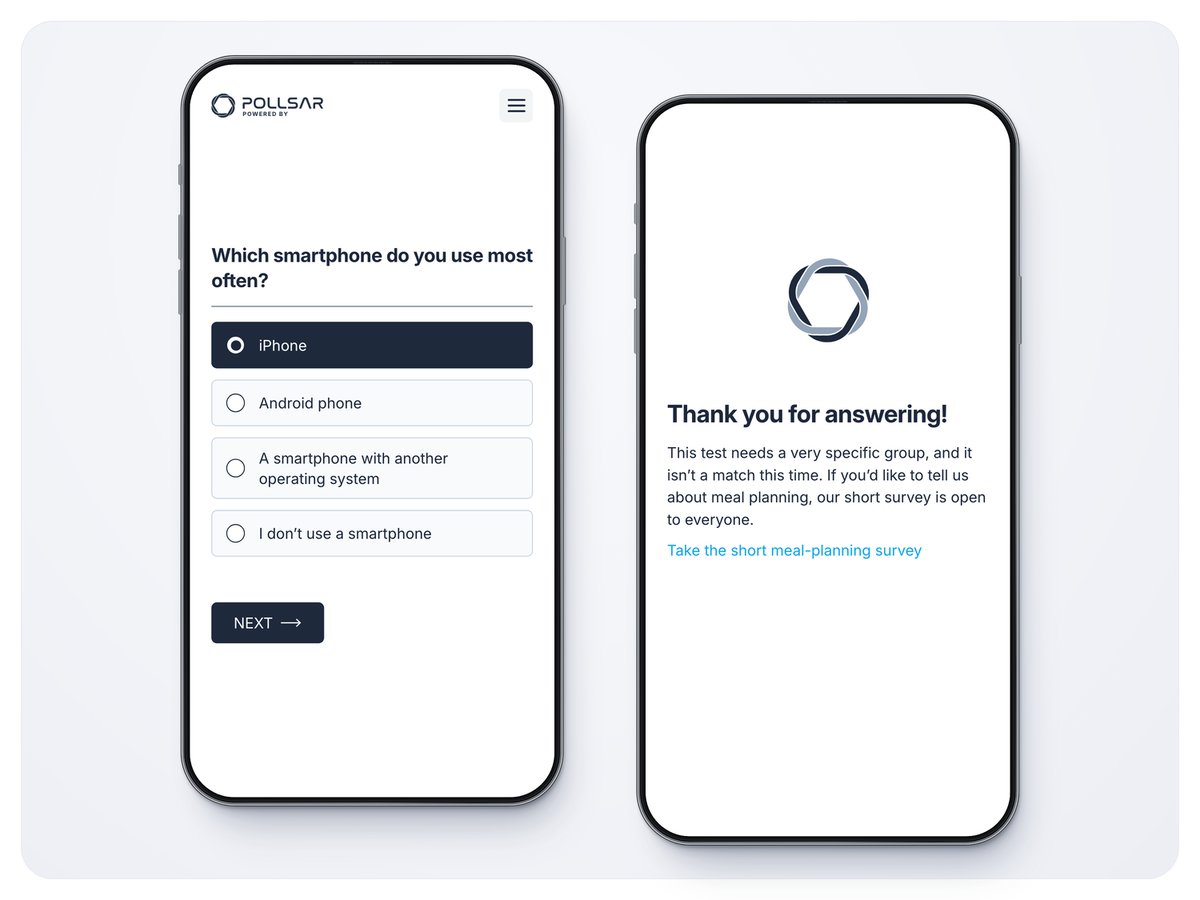
An iPhone user reaches the thank-you page after the first question
Warn people at the start that a few questions come first. A line on the welcome page such as Three quick questions first, to check this test fits you sets the expectation, so ending after question one feels fair. More on that first screen is in the guide to writing a survey introduction.
When more people qualify than you need
The beta round ends with 72 qualified people and 20 places. The other 52 did everything right, so they deserve a different message from the screen-out page. Send it once the 20 places are filled, and let each person choose whether to hear from you again.

Keep a follow-up list of those who say yes: they are your first testers for the next round. When it opens, ask them to confirm anything that could have changed, such as their main phone. If the criteria are new, they answer the screener again like everyone else.
How to screen out respondents in Pollsar
In Pollsar, screening works through survey logic. A rule on each screening question sends people who don’t qualify, the ones a panel would call disqualified, to a finish page of their own, and everyone else carries on. For the beta screener it comes down to five steps.
- Draft the survey. Describe the questions to the AI assistant on the Create with AI tab, for example Screener for a beta test: main smartphone with four options, how the last grocery list was made, field of work with None of these, household size, one open question, then email address, and it builds the survey. Check the options against your rule.
- Add a finish page for the screen-out. In the builder, press + and choose Finish page. It gets its own number, F1, and its own title and text.
- Add a rule to each screening question. Open the logic button next to the question and add a Rule: Q1 is not Android phone, action Go to F1. All conditions inside one rule must be true at once, so an either-or exit takes one rule per answer with the same action: one for Market research and one for Food or recipe apps in question 3.
- Keep the answers required. Required Answer is on by default, so nobody slips through with a blank. The Back button is off by default too; leave it off, so people can’t step back and rework an answer once a later question gives them a hint.
- Test every path. The Style tab runs a full test of the survey with all the rules, and its answers are not saved. Go through it once as each kind of person: the target, each exit, and someone who selects every field, who should land on the finish page. A test run checks the routes; the pass rate comes from real answers in a pilot.
Use a finish page rather than the End project action. End project sends people to the main final page, the one your qualified respondents see, so its thank-you text would fit nobody. Conditions for every question type, from numbers to dates, are listed in the help article on the Rule block in survey logic.
Two settings of the finish page help here. Keep the screened-out answers while you still need the pass rate: if almost everyone leaves at one question, they also show whether the cut is too strict or the wording shuts out people you want. Once you know the pilot rate, turn on Do not record responses on the screen-out page to exclude future screen-outs. The exits you recorded during the pilot stay in Results. Link to another survey places a clickable invitation on the page, a natural home for the short survey from the screen-out text.
Frequently asked questions
Is it okay to ask about age or income before people qualify?
Yes, when the answer decides who takes part, and only then. Offer ranges instead of exact figures, add Prefer not to say, and decide in advance whether that answer goes on or leaves. If age only describes your sample, ask it later in the main survey or not at all.
How is a UX research screener different?
A UX research screener picks a handful of people for interviews or usability tests, so it ends with an open question you read one by one, such as Tell us about the last time you used an app to plan your grocery shopping. Ask when people can join a session only after you have read that reply. The wording rules stay the same: behavior over yes or no, hidden cutoffs, nothing personal before someone qualifies.