Activity log
The History tab in your profile settings keeps a chronological log of key events in your account. The log helps you track activity and identify suspicious actions if needed.
To open this tab, click your avatar or nickname in the sidebar → Profile Settings → History tab.
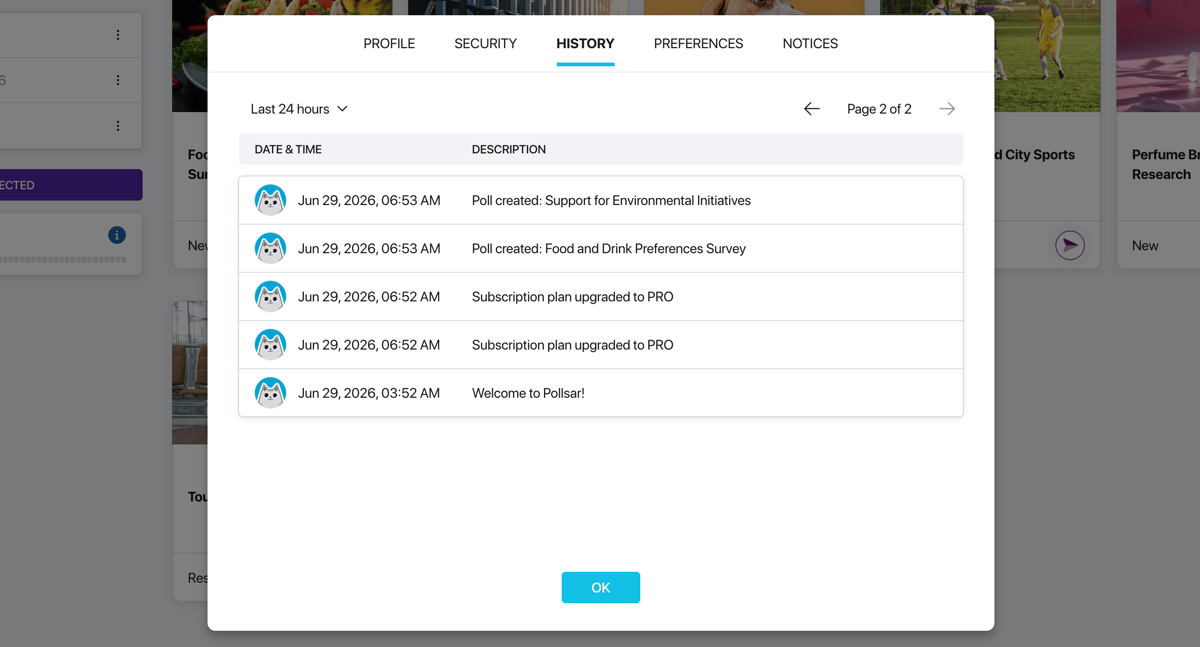
History tab
What events are recorded
The log covers all significant actions in your account:
- Security — email and password changes, enabling and disabling two-factor authentication, profile deletion and restoration.
- Subscription — plan changes, cancellation and resumption of subscription, switching to annual billing.
- Team — accepting invitations, joining teams, removing members.
- Projects — creating, opening, closing, and deleting surveys and folders.
If your team has members, their actions within your workspace are also displayed in the log. Each entry shows the avatar of the member who performed the action.
Each entry contains the date, time, and a description of the event.
Filtering
At the top of the tab there is a filter that lets you narrow the results by two parameters:
- Period — last 24 hours, week, month, or three months.
- Member — all team members or a specific user.
If there are many entries, use the page navigation at the top of the table to browse through them.