Managing your subscription
All subscription actions — changing plans, switching billing periods, cancellation, and resumption — are done in the Finance section. Open it via the profile menu → Finance.
Current plan information
At the top of the section you can see your current plan, the amount, and the date of the next automatic charge. The Change Plan button is also here — all subscription actions are available through it.
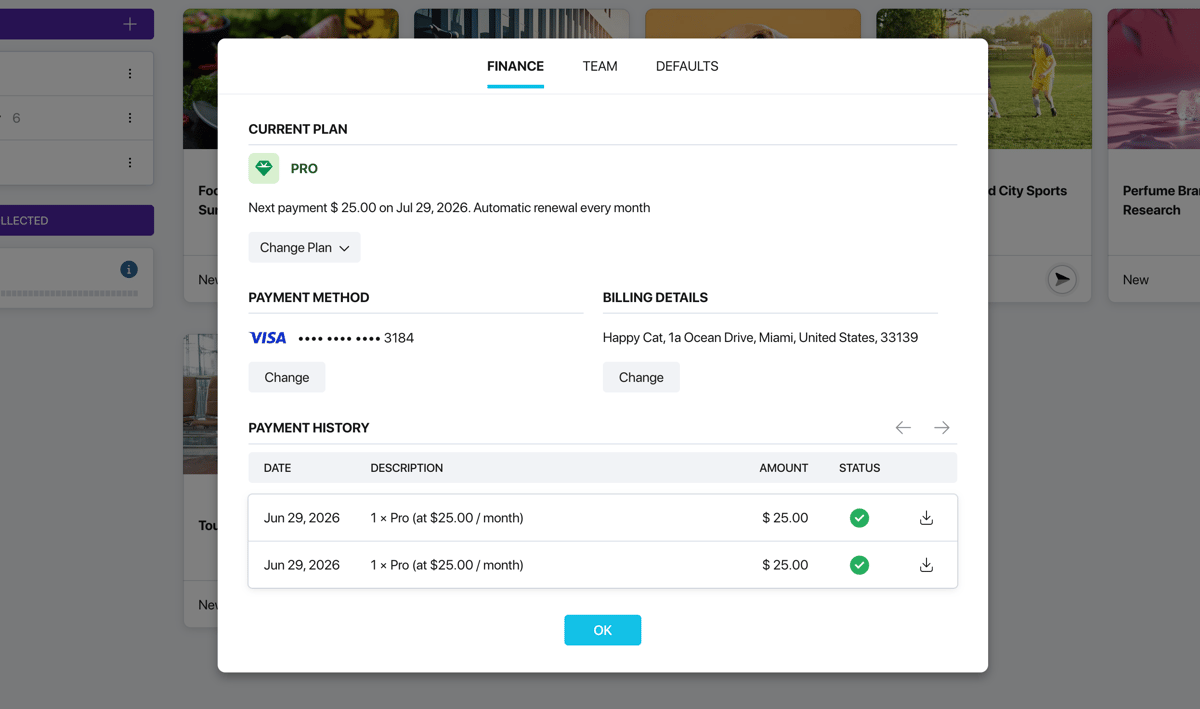
Finance section
How to change your plan
Click Change Plan and select Choose another plan. You will be taken to the Plans page where you can select a new plan. When upgrading, the new features become available immediately after payment.
Switching to annual billing
If you are paying monthly, the Change Plan menu includes the option Switch to annual plan. Annual subscriptions come with a discount. The switch takes effect immediately, and the unused balance from the current period is credited toward the total — the final amount will be reduced accordingly.
How to cancel your subscription
In the Change Plan menu, select Cancel subscription. A confirmation window will open with the following details:
- The date until which the plan remains active — you continue using all features until the end of the paid period.
- Automatic renewal is disabled — after the specified date the plan will switch to the free plan.
- You will be asked to indicate the reason for cancellation — this is optional and helps us improve the product.
Confirm the cancellation or click Keep Plan if you change your mind.
What happens after cancellation
After cancellation, your plan remains active until the end of the paid period. A warning with the exact end date will appear in the Finance section. All plan features continue to work until that date.
Once the period expires, the account will switch to the free plan. Your surveys and data will be preserved, but paid features will become unavailable.
How to resume your subscription
If you cancelled your subscription but changed your mind, click the Resume subscription button in the Finance section. Auto-renewal will be re-enabled and the plan will continue without interruption.